
How to Use Animaker for Professional Video Creation
Video content is becoming increasingly important for businesses and brands looking to engage their target audience. With the rise of platforms like YouTube and Facebook, videos have never been more popular. Animaker is an excellent, easy-to-use tool for creating professional animated videos without advanced technical skills.
In this comprehensive guide, you'll learn how to fully utilize Animaker to produce high-quality videos for your business, website, social media, and beyond.
An Introduction to Animaker
Animaker is a powerful yet user-friendly video creation platform that allows you to make animated videos for personal or commercial use. With Animaker, anyone can create studio-quality animation videos with zero experience required.
Some key features and benefits of Animaker include:
- Drag and drop interface for easily building scenes
- Professionally designed templates for quick video creation
- Ability to customize characters, backgrounds, props and more
- Library of over 1000000 free multimedia assets
- Dynamic animated video recording and editing tools
- Support for multiple video formats like MP4, AVI, MOV etc.
- Hosting and sharing options for video distribution
- Apps for iOS, Android, Windows and Mac devices
- Affordable pricing plans for individuals and businesses
Whether you need an explainer video, marketing content, online course, or any other type of animation, Animaker makes video production simple, quick and budget-friendly.
Getting Started With Animaker
Getting started with Animaker only takes a few minutes. Just follow these steps:
Step 1: Create Your Animaker Account
Go to Animaker.com and click on "Sign Up" to create your free account. You'll need to enter your name, email, password, and country to complete registration.
With the free plan, you can access all of Animaker's key features but with limited cloud storage and export capabilities. Paid plans start at $12 per month and unlock additional cloud storage, HD video downloads, and more.
Step 2: Familiarize Yourself With the Interface
Animaker uses a simple drag and drop interface that makes video production intuitive even for novices. The main workspace contains the following sections:
- Left sidebar: This houses all the assets, templates, animations, and tools for building your video.
- Central workspace: This is where you assemble scenes and edit your video timeline.
- Properties panel: Customize individual objects like characters, props, backgrounds etc.
- Animations tab: Add motions like entrance, exit, emphasis and path animations.
Spend a few minutes navigating the interface to understand what's possible when creating videos.
Step 3: Select a Template
Animaker provides professionally designed templates to make video creation even easier. Pick a template that best matches the style and purpose of your video.
You can choose from templates for explainers, marketing, eLearning, social media ads, and more. The template will load with sample visual assets that you can fully customize.
==> START YOUR FREE TRAINING NOW! <==
Step 4: Customize the Template
Don't limit yourself to the default template. Make it your own by:
- Changing the scene backgrounds: Use solid colors, illustrations, photos or videos.
- Modifying characters: Adjust colors, facial features, positions, sizes and emotions.
- Adding props: Pick suitable objects, charts, shapes, logos and text boxes.
- Using animations: Give motions to different elements like entrances, emphasis and paths.
- Inserting audio: Upload voice overs, sound effects, background scores and music.
- Adding branding: Feature colors, logo and text to match your brand identity.
Take your time to utilize the wide range of customizations in Animaker until the template exactly suits your needs.
Step 5: Create Additional Scenes
Most templates only contain a few placeholder scenes. To tell your full story, you'll need to create additional scenes from scratch.
Add new scenes by clicking the "+" button. Then customize each scene using steps 3 and 4 above. Create as many scenes as your story requires.
Use transitions like fade, wipe and zoom to smoothly move between scenes. Re-arrange scenes easily via click-and-drag.
Step 6: Record Voiceover and Audio
Voiceover narration and relevant audio are key for an impactful video. Animaker lets you easily integrate audio right in the editor.
For voiceovers, click the microphone button to record directly in Animaker. For the best results, use a quality external mic instead of your device's built-in option.
You can also upload any pre-recorded audio files like music tracks and sound effects. Drop them into the video timeline wherever needed.
Step 7: Preview and Export Your Video
Once your scenes, visuals, animations, voiceovers and other audio are in place, preview your entire video. Watch carefully and make tweaks until you're fully satisfied.
Lastly, export your completed video by clicking the Export button. Animaker supports MP4, AVI, MOV and other formats. The higher your Animaker subscription level, the higher quality you can export at.
And that's it! With these seven steps, you can leverage Animaker to produce professional-grade animated videos with ease.
Best Practices For Using Animaker
Now that you're familiar with Animaker's basics, let's look at some pro tips and best practices for using the platform:
Affiliate Marketer Are You Looking For The Best Video Creating Tool That Does Everything? The Animaker Video Tool May Be What You Have Been Waiting For!
One of the biggest fears most people have even Affiliate Marketers is the thought of actually being in front of a camera.
What do I say? How should I look? Where should I look? Will people like me?
Those are serious questions that often stop people from even getting started, and we know that getting started is half the battle.
When you actually get started the last thing you want is to run into productivity roadblocks.
As a beginner this business model will look very overwhelming and the more you listen to various Guru's the more confused you will become.
When I got started on my make money from home journey I was told that my business was free and the replicated website I received and my cell phone just for the purpose of making calls was all I would need. Then I learned the truth
The Good Marketers had on average 20 different software they used in order to make some money online and that is not very attractive to beginners
The Super Affiliates had on average 10 productivity tools they were using to make a lot of money online but that is not very attractive either because they ended up being very expensive making what was suppose to be free something that's not affordable
That's where Animaker has you covered with the videos

Animaker as stated on their website is - A platform for beginners, non-designers & professionals to create Animation
and Live-Action videos for every moment of our life
Founded in 2014 by Raghav who after trying other tools that were good but often had bugs decided to start on a journey that would lead to him creating the worlds most complete video making tool that allows you to create animated cloud based videos for free.
The mission was simple, provide companies with the necessary creative tools at a reasonable price that would not have to be outsourced.
Who Is Animaker For?

Animaker 2.0 is the current version, essentially the Animaker video tool is for any and everybody that want to 10X client aquisition with a flexible platform that have a extensive amount of resources in one place
As a Affiliate Marketer animaker has exactly what you need to stand out and tell your story in a way that most never even thought about.
I have seen so many ads online and they are all very similar. A guy in front of a car, a guy walking, a guy in a car driving, guy in a studio with a white board, and so on
But animated videos is something a little different. Imagine creating your own series featuring your created characters all with distinct voices.
All done without the need to hire any outside help.
Craft a Storyboard First
Jumping straight into Animaker without planning is a recipe for failure. Always start by crafting a comprehensive storyboard detailing every scene, asset and audio component needed.
Use your storyboard as a blueprint when building scenes in Animaker. This will help avoid missing key elements or going off track.
Keep Scenes Short
Each Animaker scene should only focus on one idea or message. Long, complex scenes are difficult to follow. Break up your story into small 3-5 seconds chunks covering a single point.
Short, focused scenes make your video crisp and easy to comprehend for viewers.
Use Quality Voiceovers
Your voiceover audio makes or breaks the video. Invest in a good microphone and record in a professional setting to capture crystal clear narration.
Write an engaging but concise script to provide context and lead the viewer through the video. Enunciate clearly and aim for a warm, friendly tone.
Optimize Animations
Animations add vital visual interest to your video. But excessive animations can be distracting. Use animations purposefully to emphasize key text and objects.
Apply simple path animations to guide the viewer's eye through the sequence of the video. Use entrance and exit animations to transition between scenes smoothly.
==> START CREATING WITH ANIMAKER FOR FREE NOW! <==
Show, Don't Tell
Animated videos are the perfect medium to demonstrate your message using visuals instead of excessive text. Replace long chunks of complex text with easy-to-understand visuals.
Well-designed characters, backgrounds, props and animations can convey insights much more effectively compared to text-heavy slides. Put Animaker's tools to work.
Add Custom Branding
Build brand awareness by incorporating your brand assets seamlessly into the video. Insert your logo, brand colors, fonts, mascots and other elements.
But don't go overboard. Branding should enhance the video, not distract from the core message. Use branding consistently and tastefully.
Be Consistent
Maintain consistency across scenes when it comes to art style, colors, fonts, branding, animations and transition effects.
A haphazard video with mismatched visual styles can end up looking unprofessional. Plan out assets and effects beforehand for consistency.
Creating Professional Marketing Videos With Animaker
Animaker is an amazing tool for creating professional marketing videos to promote your business on social media, websites, and ads. Let's explore tips for next-level marketing videos.
Grab Attention Fast
You only have a few seconds to grab the viewer's attention before they lose interest. Use an impactful opening scene with vivid visuals, enticing animations and clever text to capture interest immediately.

==> START THE 5 DAY CHALLENGE TODAY! <==
Communicate Benefits Clearly
Explain how your product or service will improve the target customer's life. Focus on emotional and functional benefits. Use visuals to show people enjoying the benefits you offer.
Showcase Value
Illustrate the excellent value your business provides compared to alternatives. Use comparison charts, graphs and other techniques to highlight your competitive edge.
Build Trust
Increase trust and credibility by displaying customer logos, testimonials, certifications and other social proof elements. Feature real customer stories and case studies.
Make A Clear CTA
Every video should end with a strong Call to Action telling the viewer what to do next - purchase now, book a consultation, sign up for a free trial etc.
Align With Branding
Ensure the video aligns seamlessly with your brand identity through color schemes, logos, fonts, iconography and tone of voice. This strengthens brand recognition.
Balance Education and Promotion
The video should educate and help the viewer, not just cram in heavy-handed sales pitches. Provide useful information and entertainment value. Mix in branding and promotions tastefully.
??????Following professional marketing video best practices will maximize your video's impact and return on investment.
What Is Animaker Used For
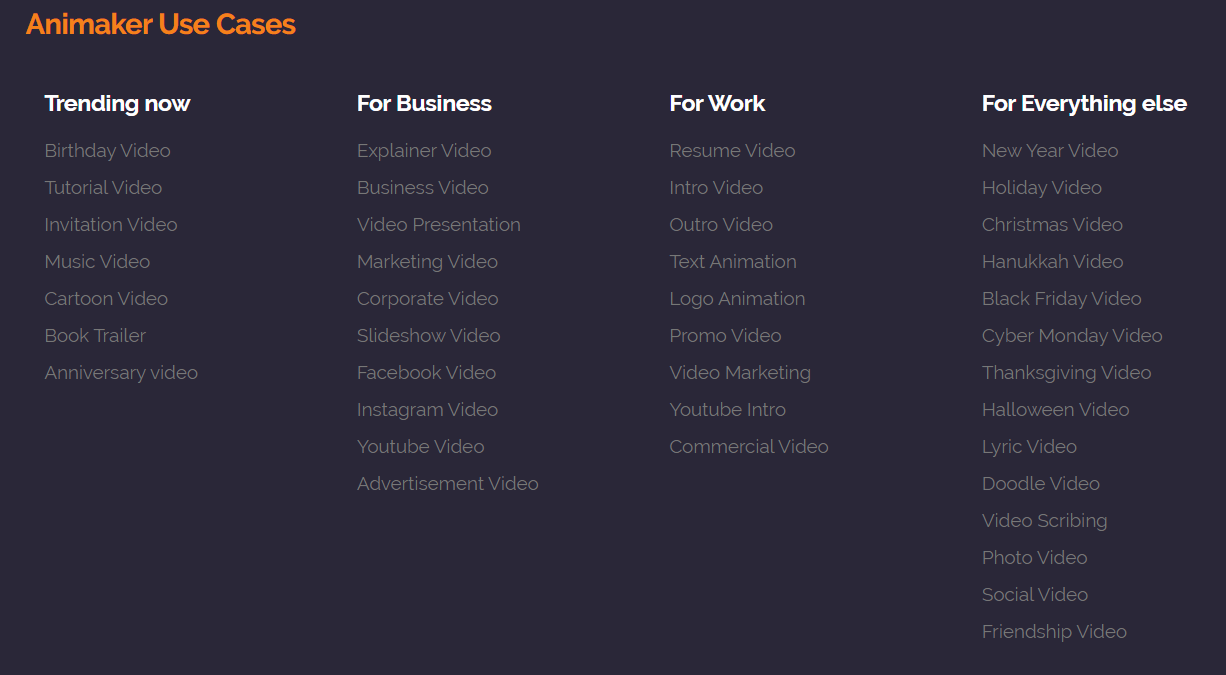
With over 9 million users who have created over 20 million videos using their over 100 milion asset library the question should be what can't it be used for
I started to use the program after searching for a voice over software to partner with another video tool I was using.
For weeks I did not know that the Animaker voice over tool was apart of a complete video making tool.
It took me about 3 weeks before I went to the Animaker home page, and that is when things changed.
Around that same time the video tool that i was currently using was no longer functioning because it operated off of flash.
Flash not working lead me to what I believe is the best animated video tool I have ever used.
Why Is Animaker The Best Animated Video Tool?
I don't know about you but I don't have a college degree and its not because I didn't want to go to college.
I did and it was only for 1 semester.
I didn't continue for a couple of reasons but that story is for another day
But the main reason was because I did not have the passion for learning in the traditional ways that college and even high school wanted me to learn.
For me its the simpler the better.
Studying out of a book, long drawn out lectures and not having the support of my professors when I needed them was the most frustrating thing to me.
Asking for help has never been my strong suit, especially knowing that there was over 30 other students that needed help and I would have to be on a waiting list.
Check out this Animaker Overview video click here
Fast, Simple Drag And Drop Builder
This was exactly what I was looking for.
Do you like to read manuals?
If I can't just pick it up and run with it, I don't want it!
As a Affiliate Marketer I have used dozens of different tools, some needed and some just for the purpose of testing to see what really was the best in that particular category.
The great thing about the Animaker video tool is that they have a fast, simple drag and drop builder.
I made my first animated video in less than 1hr.
Having a powerful character builder with billions of options, over 100 million stock videos and photos, over 1000 templates, 4k quality and even the ability to resize for social media platforms
The one thing I did not find was one of the issues Animaker aimed to solve and that was glitches
With all of this power and resources there were no glitches.
At that moment I remembered the saying jack of all trades master of none
Animaker focused on mastering one tool that happens to have tons of elements that work perfectly together
Animaker Price Plans
Monthly VS. Yearly Subscription
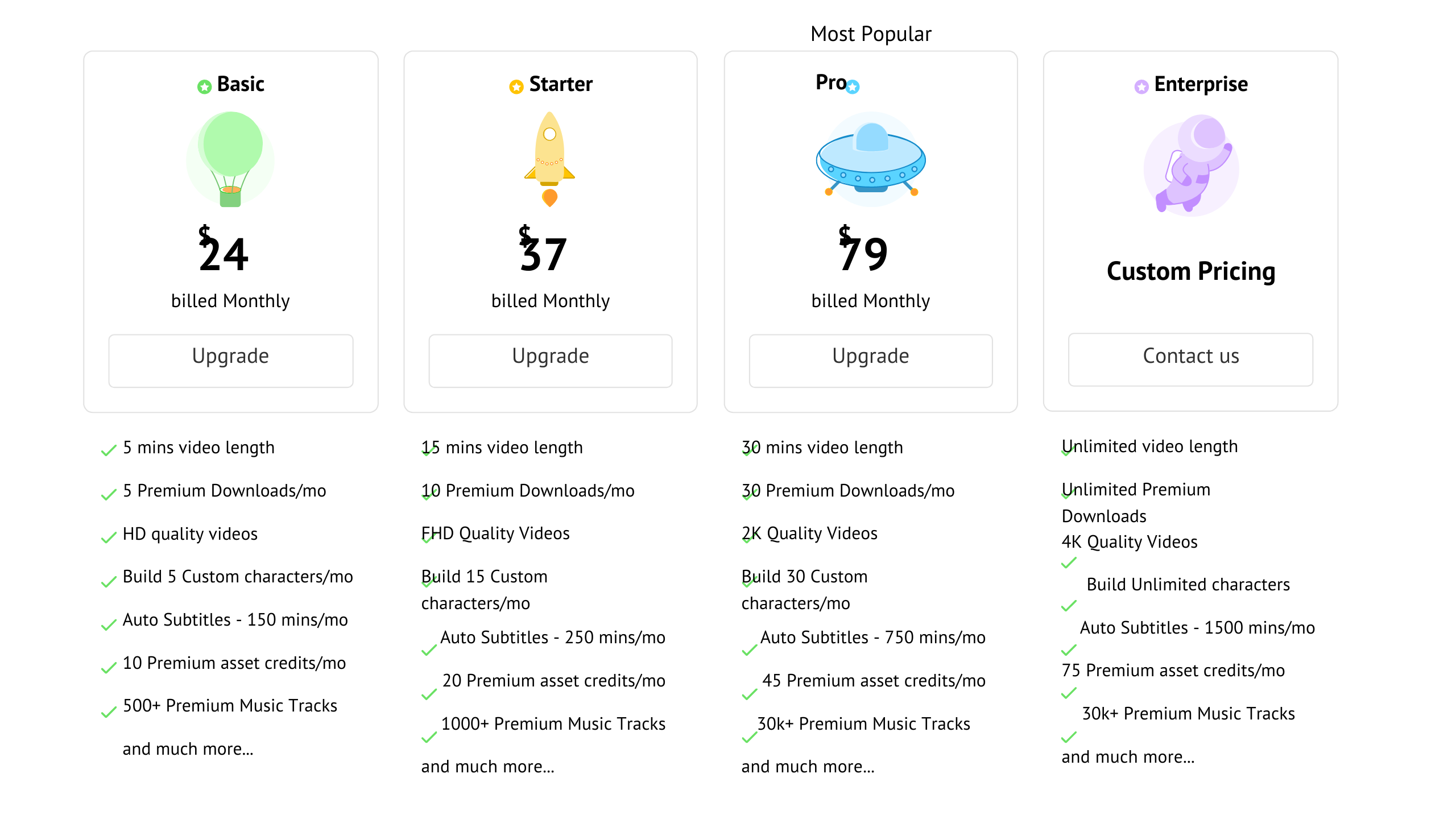
Animaker has 4 price plans 5 if you count the Free Plan. Animaker also has 2 pricing structures that you need to be aware of. One is the monthly plan and the other is yearly.
The yearly gives you a better value as compared to the monthly subscription shown below

Professional Animaker Video Creation Techniques
Beyond just the basics, employing professional techniques can further enhance your Animaker videos. Let's look at some pro tips:
Use Complementary Colors
Choose palettes with complementary hues that look aesthetically pleasing together. This creates greater visual impact. Contrasting shades also helps elements stand out.
Enable Motion Blur
Adding motion blur to moving objects makes animations appear smoother and more natural. But use subtly for a classy look instead of overdoing blur.
Include Establishing Shots
Open scenes with wide establishing shots to ground viewers and provide context before zooming into details. This improves flow and storytelling.
Cut to Silhouettes
Occasionally transitioning to silhouette shots of characters provides a dramatic effect while also masking complex animations. Use sparingly at key moments.
Overlap Audio Between Scenes
Letting audio like voiceover or music overlap between scenes makes the video feel more cohesive instead of choppy scene changes.
Use Lower Thirds
Lower third graphics with text details help convey additional information non-verbally like locations, names, dates etc.
Animate in 3D Space
Leverage 3D effects to add realism through depth, perspective shifts and positional animations. But maintain cohesion with other 2D elements.
Include Easter Eggs
Hide little surprises or references in the video only careful viewers will notice. This rewards engaged viewers.
Using these professional techniques will help your Animaker videos stand out with polish and purpose.
Improving Your Video Content With Animaker
If your current videos feel stale and ineffective, Animaker provides multiple ways to drastically improve your video content.
More Engaging Visuals
Replace static images or low-quality video with lively animated visuals that capture viewer attention and drive up engagement.
Clearer Communication
Complex ideas come across immediately through animation using visual metaphors, characters and scenarios. Simplify complex narratives.
==> START CREATING WITH ANIMAKER TODAY FOR FREE! <==
Greater Consistency
Maintain consistent branding, styles, assets, tone, animations and transitions across videos for professional coherence.
More Concise Messaging
Animaker allows you to cut out fluff and convey ideas in a concise, focused way through clean scripts and impactful visual storytelling.
Data-Driven Insights
Access built-in video analytics within Animaker to guide your content based on real viewer data.
Relevant Personalization
Animaker enables you to customize videos with relevant characters, situations and examples tailored to your unique audience for greater resonance.
Platform Optimization
Animations and motion graphics not only grab attention but also playback smoothly on today's mobile platforms compared to regular video.
Quicker Iterations
Save tremendous time by easily testing and refining multiple Animaker video versions based on viewer feedback rather than getting stuck.
Level up stale, ineffective video content by tapping into the power of Animaker.
Tips and Tricks For Animaker Video Creation
Mastering Animaker goes beyond just learning the basics. Here are some pro tips and tricks to create next-level animated videos:
Utilize Path Animations
Don't just use boring static shots. Path animations that move elements and the camera make scenes more dynamic.
Vary Character Emotions
Show different emotions on characters using Animaker's facial feature controls to make conversations feel more lifelike and engaging.
Include Motions On Logos
Add emphasis and flair to logos with subtle animations like bouncing, scaling, rotating, fading and more. But don't overdo it.
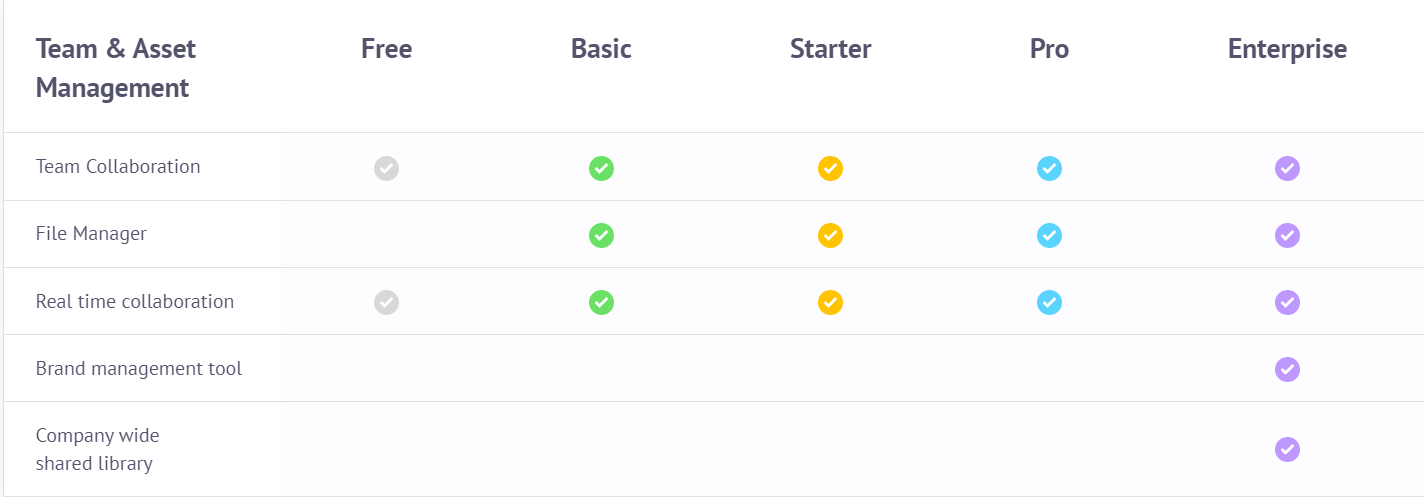
Team and Asset Management
Change Camera Angles
Switch between wide, mid and closeup shots just like live video to add visual interest and draw attention to details.
Hide Transitions With Animations
Mask scene changes using character motions and other animations so transitions don't feel abrupt or disjointed.
Use Contrasting Fonts
Pair visually distinct complimentary fonts - like a bold sans serif with a flowing script - to create more appealing text assets.
Animate In 2s and 3s
Make motions and actions feel snappier by ensuring key animations last in multiples of 2s or 3s in line with video's natural rhythm.
With these tips and tricks, you can make your Animaker videos truly stand out.
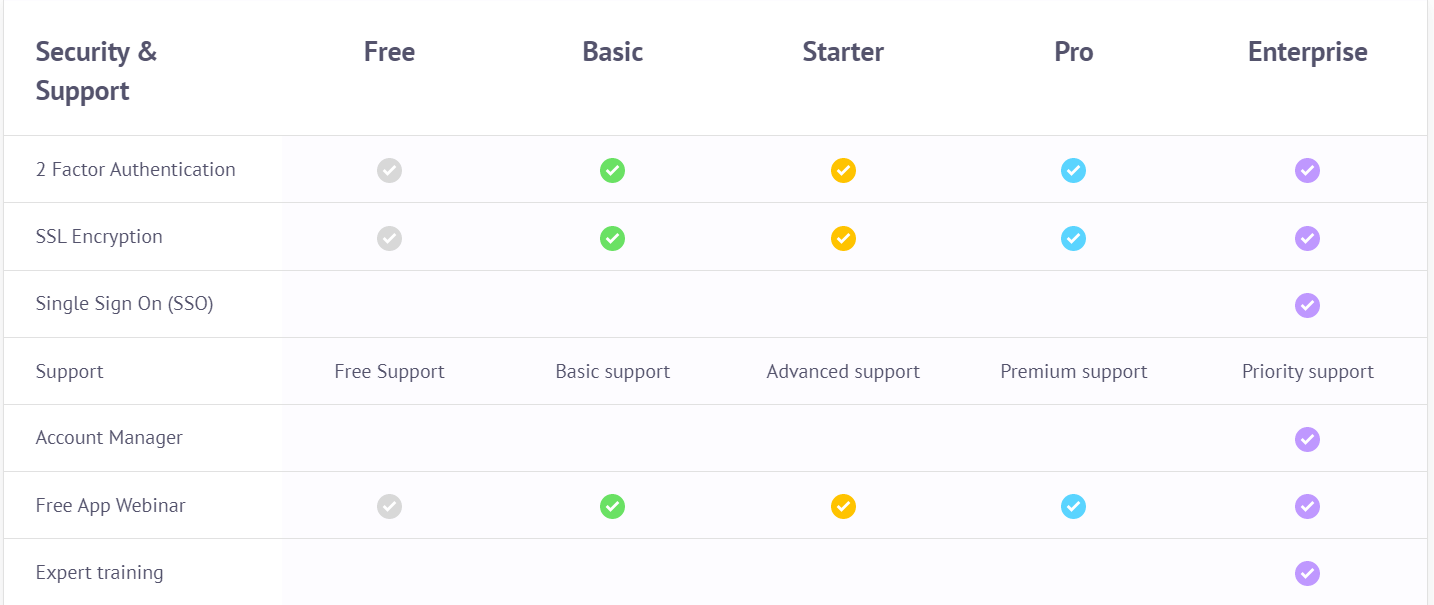
Security and Support
????????????????????????????????????
The Core Features
Though there are tons of features depending on what plan you choose
Basic
5 Premium Downloads/mo
HD quality videos
Build 5 Custom characters/mo
10 Premium Asset credits/mo
Starter
10 Premium Downloads/mo
Full HD quality videos
Build 15 Custom characters/mo
20 Premium Asset credits/mo
Pro
30 Premium Downloads/mo
2K quality videos
Build 30 Custom characters/mo
45 Premium Asset credits/mo
Enterprise
Unlimited Downloads
4K quality videos
Upto 20 GB Files upload
Build unlimited characters
For those that are beginners the Free Plan is a great place to start until you are able to upgrade
The 2 Types of Videos That Can Make You Thousands Monthly
When it comes to marketing there are 2 types of videos that can make you money online.
I like o do a lot of screen sharing style videos where I don't have to be on camera all the time when I am sharing helpful information.
The best thing about affiliate marketing is that it gives you the ability to do your business in whatever way makes you most comfortable.
For the times when I need to promote a product or make a statement that's where I have to become a little more creative.
My first go to style of video is called Live Action Videos.
These type of videos can be of you doing something or of anything in motion or in action. I personally like to use memes in my live action videos
The 2nd type is Animated Videos which up until now have been a lot more challenging to make than Live Action Videos.
Animated video creation was once reserved for programmers and people with high levels of technical skill and patience.
I have a certain level of patience but once I hit it, its a rap for whatever I'm working on.
With either type of video you can earn a significant income from home by using them to promote affiliate products that can help create a passive income.
One of the best things about Animaker is that not only is it a video creation software that makes making both types of videos easy, it also has a affiliate program attached to it.
The 5 Styles of Animated Videos
With this all in one productivity tool the sky is not the limit.
You are able to make all 5 styles of animated videos with ease using the smooth drag and drop layout
2d Videos
Handcraft Animation Videos
Infographic Animation Videos
Typography animation videos
Whiteboard animation videos
How to Make Animated Videos in 3 Steps?
Step 1: Brainstorm and write your script
Step 2: Set your scene by getting your pictures and music together
Step 3: Select a template to model or create from blank
Animaker Voice Over Tool
Animaker features a voice over tool that will make you and save you thousands
so if you have a let's say for example i like to watch a lot of online what they call webisodes little short skits that people do, now the skits are great and it's with live people right
but let's say for example in those cases where you have a person that lives in one town or state and then you have another character that lives in another state and they just can't fly out or they can't drive out to the other person so you might not have a cast member to come shoot that video for you so you might be out of luck you won't be able to do that video until they arrive
what do you do?
Animaker is a service a software a productivity tool that allows you to eliminate the need for live people to be in videos it also eliminates the need for you to have a person doing voice over you can actually cut out the expenses of hiring people to actually do those roles